
SendGrid Connector
🔗
Send SendGrid emails right from your HubSpot workflows
Trigger email sends via SendGrid directly inside HubSpot automations.
No switching platforms. No manual sends. No marketing contacts. Just the right email, at the right moment.
Stop paying marketing contacts. Start sending smarter.
With SendGrid, you pay for delivery, not for who's in your database.
Send emails to any recipient, customers, prospects, partners, or anyone else, without adding them as HubSpot marketing contacts, with SendGrid Connector.
✔️ Send emails via SendGrid from within HubSpot workflows
✔️ Use your existing SendGrid Templates and personalize emails with HubSpot contact properties
✔️ Use SendGrid's low-cost delivery for transactional emails
✔️ No more manual steps between your tools

The clever HubSpot email automation.
📎 Connect once, automate forever
Enter your SendGrid API key in HubSpot settings and you're up and running. No code, no complicated setup.
📬 Use your existing SendGrid templates
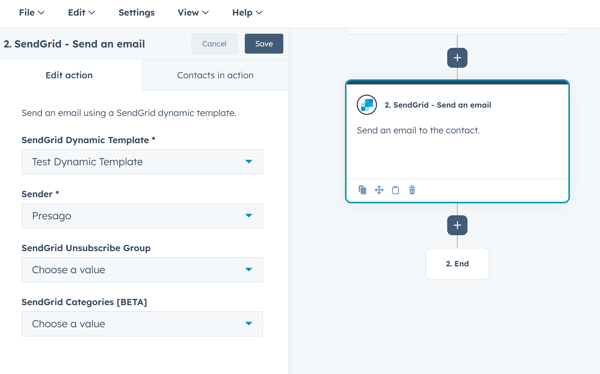
Pick a dynamic template and sender directly from your SendGrid account and let the connector handle the rest.
🧩 Native HubSpot workflow action
Add "Send an email" as a standard step in any HubSpot workflow, just like any other built-in action.
🔐 Property-based personalization
Map HubSpot contact properties to SendGrid template placeholders for fully dynamic, personalized email content.
Scale with you.
A flexible pricing that always fits your sending volume.
All plans include full access to HubSpot workflow integration and SendGrid template support.
|
Plan |
Emails/month |
Price |
|---|---|---|
|
Free |
Up to 1,000 |
$0.00 |
|
Starter |
Up to 10,000 |
$39.00/month |
|
Growth |
Up to 50,000 |
$99.00/month |
|
Pro |
Up to 100,000 |
$169.00/month |
|
Business |
Up to 500,000 |
$499.00/month |
|
Scale |
Up to 1,000,000 |
$899.00/month |
|
Enterprise |
Custom |
Custom pricing |
Why teams love it 💚
✅ No more manual triggers between HubSpot and SendGrid
✅ Contact data flows automatically into your email templates
✅ Works inside the workflows you've already built
✅ Clean setup, no dev required
✅ Send to any recipient, no marketing contact required, no extra HubSpot costs
✅ Free plan includes 1,000 sends per month
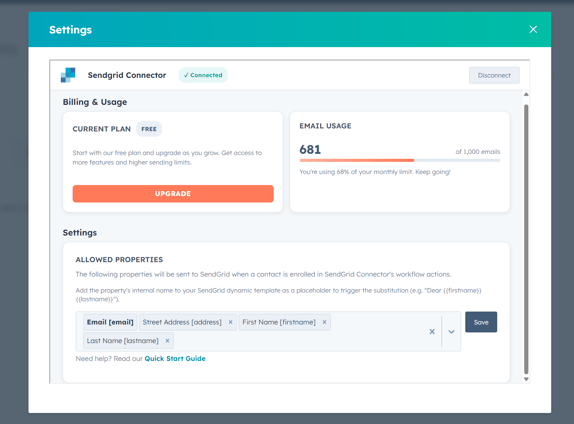
✅ Usage stats visible at a glance, right inside the app's settings

Top use cases
📨 Transactional email automation
Onboarding confirmations, order updates, password resets. Trigger the right SendGrid email the moment a HubSpot workflow fires.
🧠 CRM-powered personalization
Use HubSpot contact properties as substitution values inside your SendGrid dynamic templates for emails that feel truly personal.
📋 Lead nurturing sequences
Combine HubSpot's segmentation and automation logic with SendGrid's delivery infrastructure for reliable, scalable outreach.
Try it now!
Your CRM data is already in HubSpot. Now let it power your SendGrid emails too.
F.A.Q.
Can I send emails to contacts who are not HubSpot marketing contacts?
Yes. Unlike HubSpot's native email tools, the SendGrid Connector lets you send emails to any recipient regardless of their marketing contact status in HubSpot. This means you can reach customers, partners, or anyone else without incurring additional HubSpot marketing contact costs.
Can HubSpot send transactional emails natively?
Yes, but only as a paid add-on. HubSpot's Transactional Email feature is available exclusively for Marketing Hub Professional and Enterprise customers, and requires purchasing both the Transactional Email add-on and a dedicated IP address together. This makes it a premium solution best suited for high-volume senders already deeply invested in the HubSpot ecosystem.
If your team uses SendGrid for transactional email delivery, Presago's SendGrid Connector is a simpler alternative: no extra add-ons, no dedicated IP to configure, just connect your SendGrid account and trigger emails directly from your existing HubSpot workflows.
Do I need a SendGrid account to use this app?
Yes, you need an active SendGrid account with at least one dynamic template and a configured sender.
Is a paid plan required?
No. All users start on the Free Plan, which includes 1,000 email sends per month at no cost.
See pricing details in the HubSpot Marketplace.
Do my HubSpot contact properties get shared with SendGrid?
Only the properties you explicitly configure in the allowed properties list are passed to SendGrid to trigger template substitutions.
Which SendGrid template version is used?
If your dynamic template has multiple versions, the active one is always selected automatically.
Explore more from Presago
Integrate services from Google Workspace, Microsoft 365 and more into Atlassian Jira and Confluence.


![]()
Enhance your monday.com workspace with essential tools from Google, Microsoft and more.

![]()