
March 25, 2026
Context switching costs your team more than you might realize. Research suggests that switching between applications can consume up to 20% of a knowledge worker's productive time. For teams managing projects in Jira, Confluence, or monday.com while tracking metrics in separate tools like Power BI, Google Sheets, or HubSpot, this friction adds up fast.
The problem isn't the tools themselves. It's the disconnect between where work happens and where the data lives. When a project manager needs to check budget status, they open a spreadsheet. When a team lead reviews sprint velocity, they open Power BI. When support managers check SLA compliance, they open the CRM. Each switch breaks concentration and creates delays.
This guide covers five practical strategies for embedding external data directly into your work management platform. The goal: keep your team focused on decisions, not tab switching.
What Is Context Switching
Context switching happens when you shift your attention from one task to another. In computing, the term describes when a processor pauses one process to work on a different one. For knowledge workers, context switching means jumping between tools, projects, or types of work throughout the day.
A context switch occurs every time you move from writing a report to checking email, from a Jira board to a Power BI dashboard, or from deep analysis to answering a quick question. The switch itself takes only seconds, but the cognitive cost is higher than it appears.
When we go back and forth between tasks, our brains need time to reload the mental context of each activity. Studies suggest this reloading period can take anywhere from a few seconds for simple tasks to over 20 minutes for complex work that requires deep concentration. The more frequently you switch, the more these transition costs accumulate.
For teams using multiple business tools, context switches happen constantly. Checking a KPI requires opening Power BI. Reviewing customer history means switching to HubSpot. Updating a budget involves opening Google Sheets. Each switch feels minor in isolation, but across a full workday, the interruptions fragment attention and slow down decision-making.
Why Context Switching Hurts Team Productivity
Context switching doesn't just waste time. It disrupts the mental models your team builds while working on complex problems. For decision makers, the cost shows up clearly: meetings run longer because participants pull data from multiple sources, decisions get delayed when stakeholders can't access metrics quickly, and teams develop workarounds like copying numbers into emails or documents, which creates stale data problems.
Embedding data where work happens eliminates these friction points. Instead of asking "where do I find that number?", your team sees the information they need in context.
Strategy 1: Bring KPIs Where Work Happens
The problem: Project teams track work in Jira or monday.com but check performance metrics in Power BI. Sprint planning, daily standups, and retrospectives require switching between systems to compare what the team accomplished against what the business needed.
The solution: Embed Power BI dashboards directly into project dashboards and documentation pages. A velocity chart that updates automatically saves time during sprint reviews. A budget burn rate visible alongside project tasks helps teams make scope decisions faster.
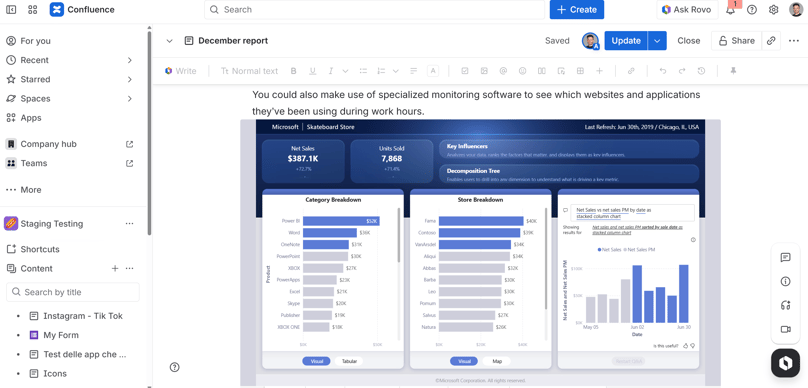
What to embed: Sprint velocity trends, budget utilization charts, quality metrics like defect rates, and delivery timeline comparisons. Choose metrics that inform the decisions your team makes most frequently.
The benefit: Product managers see performance context while grooming the backlog. Team leads spot problems earlier because warning signs appear in their daily workspace, not in a separate tool they might forget to check.
Strategy 2: Centralize Documentation with Live Data
The problem: Team documentation in Confluence or monday.com docs references data that lives in spreadsheets. Budget tables and project timelines get copied and pasted, then become outdated as soon as the source changes.
The solution: Embed Google Sheets directly into documentation pages. When the source spreadsheet updates, the embedded view reflects those changes automatically.
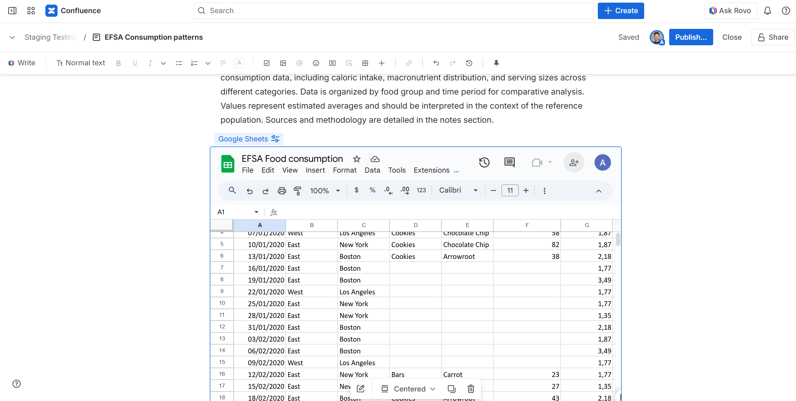
What to embed: Budget tracking sheets, resource allocation tables, project timelines, pricing models, and any tabular data that changes regularly and informs team decisions.
The benefit: Stakeholders reading documentation see current numbers, not last month's snapshot. Finance teams update their spreadsheets once, and every linked document reflects the change.
You can download the apps and try them for free:
Strategy 3: Create Single-Pane Team Dashboards
The problem: Team leads check multiple systems to understand team health. Project status in Jira, metrics in Power BI, pipeline in HubSpot, budgets in Google Sheets. Getting a complete picture requires opening four or more applications.
The solution: Build consolidated dashboards that embed data from all relevant sources in one view. A single page can show project status, key metrics, sales pipeline highlights, and financial summaries together.
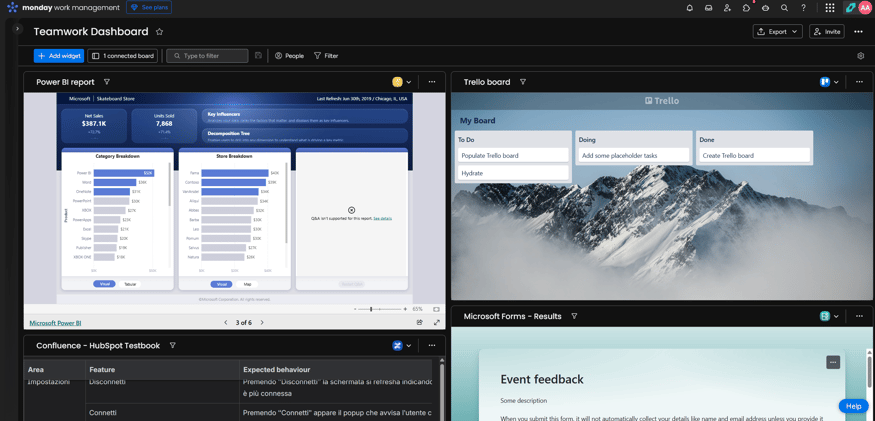
What to embed: Combine Power BI analytics, Google Sheets budget trackers, and HubSpot pipeline summaries. Include only the metrics that matter for the specific team or initiative.
The benefit: Status meetings start faster because the information is already visible. Executives get a unified view without requiring access to each underlying system.
Strategy 4: Embed CRM Context in Support Issues
The problem: Support teams handle tickets in Jira Service Management or monday.com, but customer context lives in HubSpot or another CRM. Agents waste time switching to the CRM to check customer history, account status, or recent interactions before responding.
The solution: Embed HubSpot contact records or deal information directly into support tickets. When an agent opens a ticket, they see the customer's account tier, recent purchases, open deals, and interaction history without leaving their support queue.
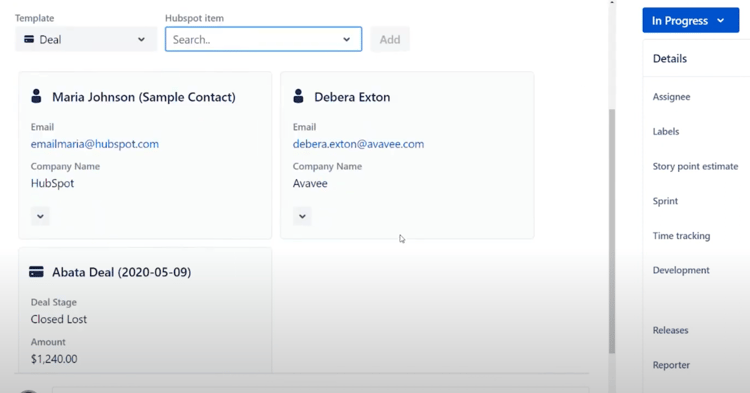
What to embed: Customer contact details, account status, recent activity timeline, open opportunities, and any notes from sales or success teams. For product support, include information about which features the customer uses or which plan they're on.
The benefit: Response times improve because agents have context immediately. Escalation decisions become easier when account value is visible alongside the technical issue. Support interactions feel more personalized because agents don't need to ask for information the company already has.
Strategy 5: Connect Budget and Forecast to Projects
The problem: Project managers track deliverables in Jira or monday.com but manage budgets in spreadsheets. Decisions about scope and resources happen without visibility into financial impact.
The solution: Embed budget spreadsheets and financial dashboards into project spaces. Link forecast models to the projects they fund. When project timelines shift, stakeholders immediately see budget implications.
What to embed: Project budget tracking sheets showing allocated versus spent amounts. Forecast models, resource cost calculators, and monthly financial summaries relevant to specific initiatives.
The benefit: Scope decisions include financial context from the start. Finance teams gain visibility into project status without attending every standup.
Choosing the Right Data to Embed
Not every piece of data belongs in your work management platform. Focus on information that directly supports decisions your team makes regularly. A good embedding candidate meets three criteria: it changes frequently enough that manual updates would be burdensome, it's referenced during routine activities like standups or planning sessions, and it helps someone take action rather than just providing background information.
Start with one or two embeddings and expand based on what your team actually uses. A dashboard full of embedded data that nobody looks at creates clutter, while you should aim for clarity.
Getting Started
Data embedding works best when it fits naturally into existing workflows. Identify the specific moments when your team switches tools to find information, then target those friction points first.
Presago offers integration apps for embedding Power BI, Google Sheets, and HubSpot into Jira, Confluence, and monday.com. Each app handles authentication and keeps embedded content current without manual refresh.
Explore Presago's embedding solutions for Atlassian and monday.com to see how your team can reduce context switching and keep focus where it belongs: on the work that matters.
FAQ
What are context switches in the workplace?
Context switches are the mental transitions that happen when you move between different tasks, tools, or types of work. Each switch requires your brain to disengage from one activity and re-engage with another, which consumes time and cognitive energy. In tool-heavy work environments, context switches occur frequently as teams jump between project management platforms, analytics dashboards, spreadsheets, and communication apps.
How long does it take to set up data embedding?
Most embedding integrations take five to ten minutes for initial setup.
Do embedded reports update automatically?
Yes. Embedded content reflects the current state of the source data. When your Power BI dashboard refreshes, Google Sheet updates, or HubSpot record changes, the embedded view shows the new information automatically.
Will embedded data slow down my pages?
No. Embedded content loads independently and don't affect page performance.
Can different team members see different data based on permissions?
Yes. Embedding apps typically respect the permissions set in the source system. If someone doesn't have access to a report in the original application, they won't see it in the embedded view either.
Which data sources can I embed?
Common options include Power BI dashboards, Google Sheets, and HubSpot CRM records. The specific options depend on which integration apps you install.