
July 30, 2026
Anyone running email at scale on HubSpot has probably done the math at some point. Marketing contacts count against your plan tier, transactional email requires an add-on, and both scale with the size of your database rather than with how many emails you actually send. The result is that a small increase in audience can push you into a higher tier, even if your sending volume has not changed.
This article works through the numbers for three realistic scenarios, comparing HubSpot's native pricing to sending the same volume through Presago's SendGrid Connector. The scenarios progress from smaller audiences with monthly sends to large databases with recurring communication, so you can find the one closest to your setup.
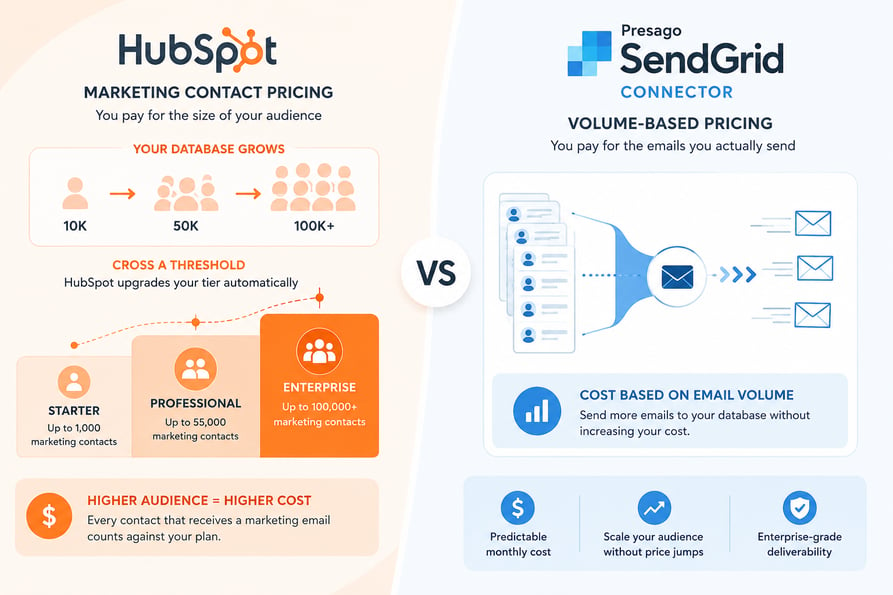
Why Marketing Contact Pricing Becomes a Problem
HubSpot's model prices email around the audience, not the volume. Every contact that receives a marketing email must be classified as a marketing contact, and marketing contacts count against your plan tier. Cross a threshold and HubSpot upgrades your tier automatically, with no mid-term downgrade available.
For small, focused databases this works fine. It becomes expensive quickly when the audience includes customers, partners, churned accounts, and everyone else who might reasonably receive a workflow email. A database of 50,000 records typically contains all of these, and the moment any of them receives a workflow send, they count.
The transactional email add-on removes the marketing contact requirement but introduces its own constraints. It requires Marketing Hub Professional or Enterprise as a prerequisite, adds a mandatory dedicated IP, and restricts you to service-related content only. Nurture flows, onboarding sequences, and operational notifications don't qualify.
The three scenarios below show what this looks like in numbers.
Scenario 1: 10,000 Contacts, One Email Per Month
A small marketing team runs a monthly newsletter to 10,000 recipients. That is 10,000 emails per month.
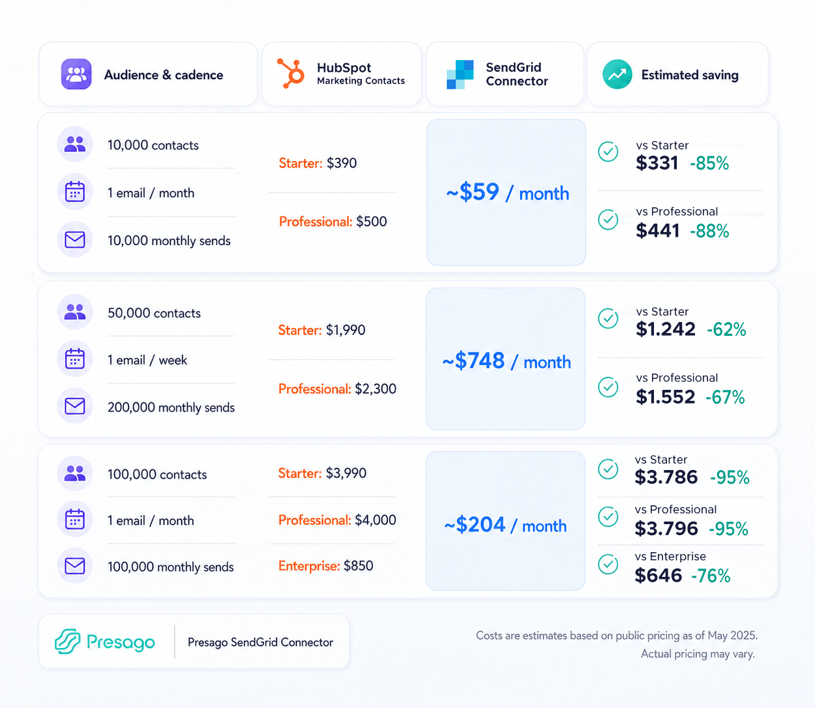
Sending the same volume through SendGrid Connector and SendGrid costs approximately $59/month.
| HubSpot plan | Estimated marketing-contact cost | Estimated saving |
|---|---|---|
| Starter | $390 | $331, approximately 85% |
| Professional | $500 | $441, approximately 88% |
Even a relatively small audience becomes expensive when every recipient must be classified as a marketing contact. For companies on HubSpot Starter or Professional, volume-based delivery can reduce the estimated cost of reaching 10,000 contacts by more than 80%.
This scenario applies to monthly newsletters, webinar invitations, customer notices, and product announcements.
Scenario 2: 50,000 Contacts, One Email Per Week
A mid-size company sends weekly communications to 50,000 recipients. Four emails per contact per month means 200,000 monthly sends.
SendGrid Connector and SendGrid handle this volume for approximately $748/month.
| HubSpot plan | Estimated marketing-contact cost | Estimated saving |
|---|---|---|
| Starter | $1,990 | $1,242, approximately 62% |
| Professional | $2,300 | $1,552, approximately 67% |
The audience receives approximately one email per week, which is representative of a regular communication program rather than an occasional campaign. Despite the higher frequency, the estimated delivery cost stays substantially below the cost of maintaining 50,000 HubSpot marketing contacts.
The saving here is smaller in percentage terms than in Scenario 1, but larger in absolute value. This scenario applies to recurring newsletters, customer education programs, community updates, and structured nurturing flows.
Scenario 3: 100,000 Contacts, One Email Per Month
A larger company needs to reach 100,000 recipients once per month. That is 100,000 monthly sends.
SendGrid Connector and SendGrid deliver this volume for approximately $204/month.
| HubSpot plan | Estimated marketing-contact cost | Estimated saving |
|---|---|---|
| Starter | $3,990 | $3,786, approximately 95% |
| Professional | $4,000 | $3,796, approximately 95% |
| Enterprise | $850 | $646, approximately 76% |
This is the strongest cross-plan comparison. HubSpot still requires the full audience to be counted as marketing contacts, while volume-based delivery prices the activity according to the actual number of emails sent.
Reaching 100,000 recipients once per month requires up to approximately $4,000 in additional marketing-contact capacity on HubSpot Starter or Professional and approximately $850 on Enterprise. The same email volume delivered through SendGrid Connector and SendGrid costs approximately $204 per month.
This scenario demonstrates that the cost advantage extends beyond lower HubSpot plans. When the audience is large and the communication frequency is low, volume-based delivery is significantly more economical than HubSpot Enterprise as well.
Typical use cases here include customer-wide announcements, renewal reminders, event invitations, policy updates, and large monthly newsletters.
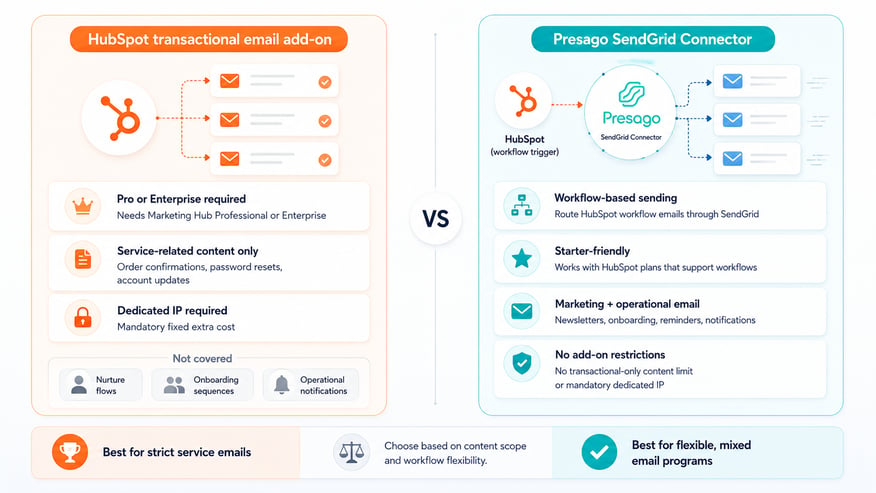
Comparing SendGrid Connector to the HubSpot Transactional Email Add-On
Some of the scenarios above overlap with what HubSpot's transactional email add-on is designed to handle. The add-on removes the marketing contact requirement, but the comparison has three constraints worth noting.
Prerequisite plan. Transactional email requires Marketing Hub Professional or Enterprise as a base. Companies on Starter cannot use it without upgrading to a higher plan first, which changes the total cost calculation significantly.
Content restrictions. The add-on is limited to service-related emails, meaning order confirmations, password resets, and account updates. Nurture sequences, onboarding flows, and operational notifications outside this scope are not covered.
Dedicated IP requirement. The add-on includes a mandatory dedicated IP charge on top of the base price, which adds a fixed cost regardless of volume.
SendGrid Connector routes any workflow-triggered email through SendGrid without these restrictions. The comparison is not one-to-one because the two approaches serve slightly different use cases, but for most email programs that mix marketing and operational content, volume-based delivery covers both without the tier upgrade and content limits.
When SendGrid Connector Makes the Most Sense
The pattern across the three scenarios is consistent. Volume-based delivery is most cost-effective when the audience is large relative to the sending frequency, or when the audience includes contacts that shouldn't count as marketing contacts, such as customers, partners, and churned accounts.
The advantage is particularly visible in two situations. When a company is on HubSpot Starter or Professional and the marketing contact count is approaching the next tier threshold, avoiding an automatic tier upgrade is often reason enough. And when a company is already on Enterprise but sends infrequently to a large database, volume-based pricing remains more economical than paying for full marketing-contact capacity that goes largely unused.
Setup takes three steps and about five minutes. For the full technical walkthrough — including how the workflow step works, how contact data maps to SendGrid templates, and the step-by-step configuration — see our SendGrid Connector setup guide.
FAQ
Do transactional emails count as marketing contacts in HubSpot?
Emails sent through HubSpot's transactional email add-on do not count contacts as marketing contacts. However, the add-on has three requirements that limit its use: it requires Marketing Hub Professional or Enterprise as a prerequisite, includes a mandatory dedicated IP charge, and restricts content to service-related emails only. Nurture flows, onboarding sequences, and operational notifications outside this scope are not covered.
Can I use SendGrid Connector without upgrading my HubSpot plan?
Yes. SendGrid Connector works with any HubSpot plan that supports workflows, including Marketing Hub Starter. Unlike the transactional email add-on, it does not require Professional or Enterprise as a prerequisite, and it is not restricted to service-related content.
What happens to email tracking and analytics when I send through SendGrid?
Emails sent through SendGrid Connector are delivered by SendGrid, so open and click tracking, bounce handling, and deliverability reporting happen in SendGrid rather than in HubSpot. Workflow triggers and contact-level activity remain in HubSpot, so the contact record still shows that an email was sent, but the delivery-level metrics live in SendGrid's dashboard.
Is SendGrid Connector suitable for GDPR-compliant email sending?
Yes. SendGrid supports the same consent management, unsubscribe handling, and data processing standards required by data protection regulations. The connector passes contact data from HubSpot to SendGrid based on the workflow you configure, so the compliance responsibility remains with how you set up the workflow and manage consent in HubSpot, exactly as it would with native HubSpot sending.
How is this different from the technical setup guide?
This article focuses on cost comparison across three scenarios. The technical setup guide covers how the workflow step works, how contact data maps to SendGrid templates, and the step-by-step installation process. If you have decided that volume-based delivery makes sense for your situation, that article covers the implementation.
Try SendGrid Connector for HubSpot - Free up to 1,000 sends/month