
March 24, 2026
At some point, every growing team using HubSpot runs into the same wall. You need to send emails from a workflow. This could be a follow-up after a form submission, a message when a deal moves stages, a notification triggered by a contact reaching a specific lifecycle point. Since the automation logic is already in place and the contacts are already in the CRM, you'd expect sending the email to be the easy part.
Then you look at what it actually costs, and the picture changes.
HubSpot offers two native ways to send emails from workflows. Both come with constraints that, at scale, become expensive. This article explains what those constraints are and how routing through SendGrid sidesteps them without changing how your workflows operate.
The Two Native HubSpot Email Options and Why Both Have Problems
Marketing emails: capped by your contact tier
Marketing emails in HubSpot are the standard workflow option. They require no additional purchase and integrate with HubSpot's native tracking and reporting.
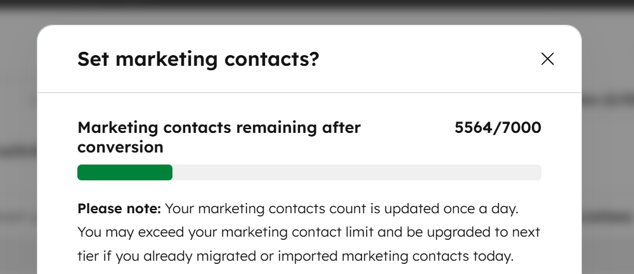
The catch: a contact must be flagged as a marketing contact before you can send them a marketing email. And the number of marketing contacts your account can hold is determined by your plan tier with costs that scale as that number grows.
For teams with large or mixed contact databases, this creates a real constraint. A contact list of 50,000 records might include customers, prospects, partners, and churned accounts. Not all of them are actively marketed to. But the moment any of them receive a workflow email, they count toward your marketing contact limit. Staying under the threshold means either limiting who receives workflow emails or paying for a higher tier.
Transactional emails require a separate and costly add-on
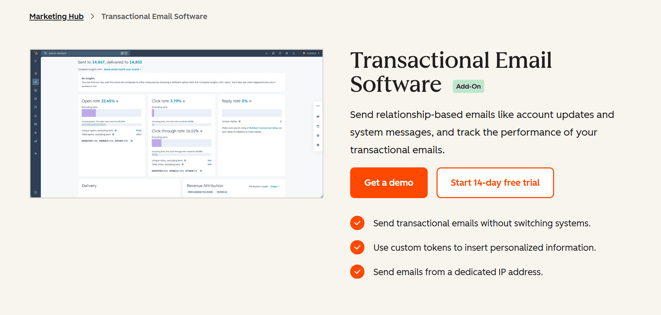
HubSpot does offer a second option for sending emails to contacts that are not flagged as marketing contacts. This approach does not require the recipient to be a marketing contact, so it removes the contact tier pressure.
The problem is the cost. This functionality requires purchasing a dedicated add-on, sold separately from the main plan, at a price that adds significant expense on top of what most teams are already paying. For many organizations, the add-on costs more than the problem it solves. On top of that, transactional emails are not intended for marketing use, but only for one-to-one service messages.
So the choice, natively, is between a hard contact ceiling on one side and a steep additional purchase on the other.
A Third Option: Route Through SendGrid
SendGrid is an email delivery service built for reliable, high-volume sending. It supports dynamic templates - emails with placeholder fields that populate with real contact data at send time - and is already part of the stack for many marketing and operations teams.
So, to harness the deliverability and cost efficiency of SendGrid alongside the automation logic of HubSpot, how do you actually bring the two together? The answer is already built for you, in the form of a native HubSpot app.
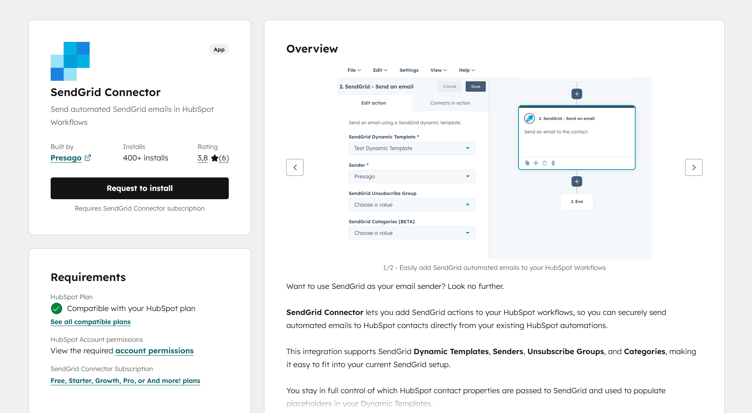
The SendGrid Connector for HubSpot connects your SendGrid account directly to your HubSpot workflows. Once configured, you add a "Send an email" step to any workflow that uses SendGrid as the delivery mechanism. The email goes out through SendGrid's infrastructure, not HubSpot's.
Because the send bypasses HubSpot's email system entirely, the contact is not flagged as a marketing contact and does not count toward your tier limit. No add-on required. No contact tier pressure. The workflow triggers, SendGrid delivers, and your HubSpot contact counts stay exactly where they are.
Unlike HubSpot's transactional email add-on, in Presago's SendGrid Connector there are no restrictions on email type. Follow-ups, nurture sequences, operational notifications, onboarding emails - any email you can build in a SendGrid dynamic template can be triggered from a HubSpot workflow.
This is not a workaround that requires technical complexity to maintain. HubSpot handles the automation logic, while SendGrid handles the delivery. If your team also connects HubSpot to Jira, the same principle applies: see our HubSpot Jira integration guide for a full setup walkthrough.
The cost difference in practice
Sending emails through HubSpot’s native options adds up fast. At the time of writing, in a 50,000 emails/month scenario, HubSpot’s native tools (marketing contacts tier + transactional add-on + mandatory dedicated IP add-on) cost about $3,130/month, compared with about $119/month for Presago + SendGrid (Presago SendGrid Connector Growth plan + SendGrid API Essentials).
At 100,000 emails/month, the same HubSpot stack (with 100,000 marketing contacts) costs about $5,630/month, versus about $259/month for Presago + SendGrid (Presago SendGrid Connector Pro plan + SendGrid API Pro).
| Monthly email volume | HubSpot native | Presago + SendGrid | Cost difference |
|---|---|---|---|
| 50,000 emails/month | ~$3,130/month | ~$119/month | ~26x higher |
| 100,000 emails/month | ~$5,630/month | ~$259/month | ~21x higher |
The difference is not marginal. For most teams, the savings alone can cover the cost of several other tools in their stack.
SendGrid Connector pricing scales with your sending volume. Current plans are on the app's official page.
How the Setup Works
The connector requires an active SendGrid account with at least one dynamic template and a verified sender address. On the HubSpot side, you need workflow editing permissions.
As shown in the dedicated Quick Start guide, setup takes just a couple minutes:
1. Connect your SendGrid account. In HubSpot, open the SendGrid Connector app settings and enter your SendGrid API key. The connection is established immediately. No code required.
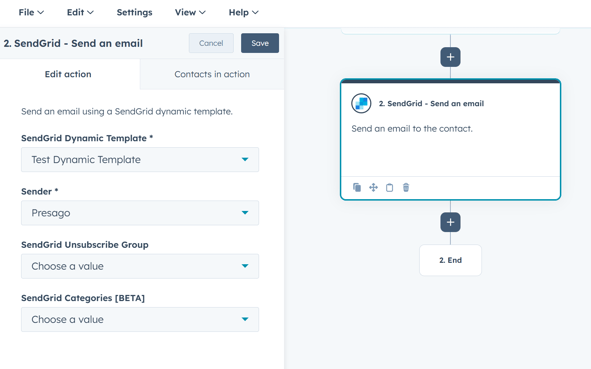
2. Add the email step to a workflow. In any existing or new HubSpot workflow, add a "Send an email" action and select the SendGrid Connector option. Choose your dynamic template and sender. If your template has multiple versions, the connector automatically uses the active one.
3. Map HubSpot properties to template placeholders. SendGrid dynamic templates use variable fields - for example, or Presago S.r.l.. In the connector settings, you add the HubSpot contact properties that you want to use in your SendGrid dynamic templates. You just need to make sure that template placeholders match the properties internal names.
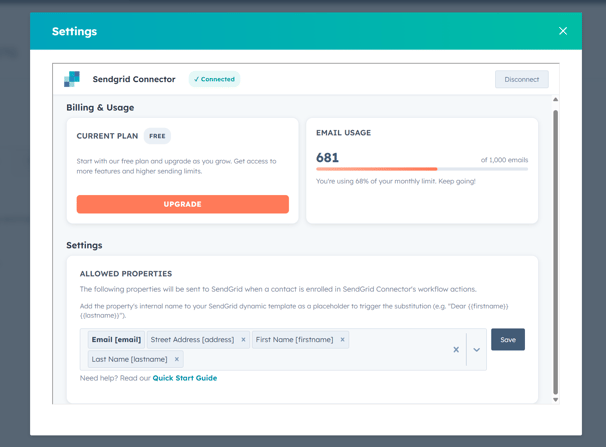
When the workflow fires, the actual contact data fills in automatically.
From that point, the workflow runs as normal. A contact meets the enrollment criteria, the step triggers, and the email goes out through SendGrid personalized with the contact's data, with no impact on your HubSpot marketing contact count.
Where This Makes the Most Difference
The SendGrid Connector fits teams in any of these situations:
- Your marketing contact limit is close to its ceiling and you need to run additional workflow-based communications without triggering a plan upgrade.
- You have a large mixed contact database - customers, prospects, partners, churned accounts - and workflow emails to those contacts would otherwise push you into a higher tier.
- You are evaluating HubSpot's dedicated email add-on and want a cost-effective alternative that keeps sending inside your existing workflow setup without the additional purchase.
- You already use SendGrid for other email operations and want to manage templates in one place rather than duplicating them as HubSpot emails.
What to Keep in Mind
A few practical notes before you set this up:
Data privacy: Only the HubSpot contact properties you explicitly configure in the allowed properties list are passed to SendGrid. No other contact data is shared.
Email analytics: As you're delegating email sends to SendGrid, open rates, click tracking, and delivery metrics are reported through SendGrid's dashboard rather than HubSpot's native email analytics. Plan your reporting setup accordingly. For a broader look at how to structure your data tools, see Data Management Tools: How to Build a Stack That Works.
Sender verification: Your SendGrid sender address must be verified in your SendGrid account before the connector can use it. This is a standard SendGrid requirement.
Free plan: The connector includes a free tier covering 1,000 sends per month. Paid tiers scale with volume. Full pricing is on the app's official page.
FAQ
Does sending through SendGrid Connector flag a contact as a marketing contact in HubSpot? No. The send goes through SendGrid's infrastructure, not HubSpot's email system. The contact is not flagged as a marketing contact and does not count toward your tier limit.
How does SendGrid Connector compare to HubSpot native options? HubSpot offers two native paths, and both add significant cost to your existing plan. The first is upgrading your marketing contacts tier. As your contact list grows, so does your monthly bill, and HubSpot upgrades you automatically the moment you cross a threshold. There is no mid-term downgrade. The second is the transactional email add-on, which requires Marketing Hub Professional or Enterprise as a prerequisite, plus a mandatory dedicated IP add-on on top. Beyond the cost, it also restricts content to service-related messages only: order confirmations, password resets, account updates. SendGrid Connector bypasses both paths. You pay only for the emails you send, starting free up to 1,000 sends/month, with no HubSpot add-on required, no contact tier increase, and no restrictions on the type of email you send.
Can I personalize emails with HubSpot contact data? Yes. You map HubSpot contact properties to SendGrid template placeholders in the connector settings. The values populate automatically when the workflow triggers.
Do I need a paid SendGrid account? No. The connector's free plan covers 1,000 sends per month. Paid plans are available for higher volumes from within the app's settings. The app's official page covers plans in detail.
Does this work with existing HubSpot workflows? Yes. You add the SendGrid Connector email step to any existing workflow as you would any other action. Your enrollment criteria, branching logic, and delays remain unchanged.
Try SendGrid Connector for HubSpot - free up to 1,000 sends/month
Read the Quick Start documentation