
July 1, 2026
The question comes up often enough that it deserves a direct answer. HubSpot and monday.com are both popular, well-built tools. They overlap in some areas, serve different purposes in others, and many teams end up using both. Whether you are evaluating one for the first time or trying to decide if you need both, the comparison is worth working through carefully.
What Each Tool Is Built to Do
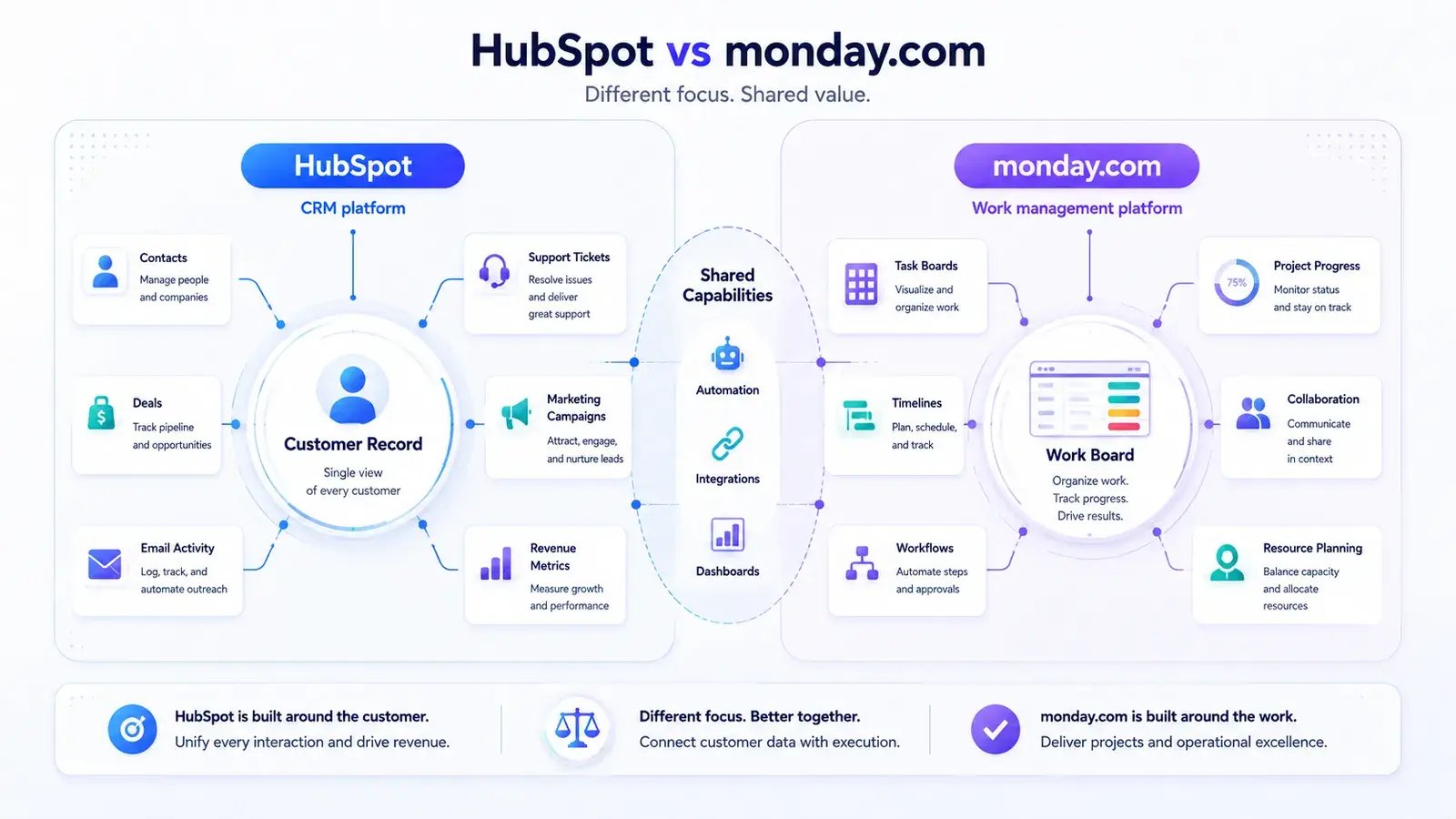
HubSpot is a CRM platform. Its core function is managing relationships with customers and prospects: tracking contacts, deals, and communication history, running marketing campaigns, handling support tickets, and giving sales teams a structured view of the pipeline. Everything in HubSpot is organized around the customer record.
monday.com is a work management platform. Its core function is helping teams plan, track, and collaborate on work: projects, tasks, workflows, timelines, and resource allocation. Everything in monday.com is organized around boards, items, and the status of work in progress.
The overlap between them is real but limited. Both can be used to track a pipeline of some kind. Both support automation and integrations. Both have dashboards. But they approach these capabilities from different directions and for different primary audiences.
Where HubSpot Is the Right Choice
HubSpot is the right choice when the primary need is managing customer relationships at scale.
Sales teams use it to track deals through a pipeline, log calls and emails, and get visibility into where each prospect stands. Marketing teams use it to run campaigns, manage lists, and connect campaign activity to revenue. Support teams use it to manage tickets and track customer satisfaction.
HubSpot also has depth in reporting on revenue-related metrics: deal velocity, conversion rates, campaign attribution, and customer lifetime value. If these are the metrics that matter to your team, HubSpot is built for them.
Where HubSpot is less strong is in managing the execution of work that is not customer-facing. Internal projects, product development, team operations -- these are not what the tool is designed for, and using it for them tends to create workarounds rather than clean workflows.
Where monday.com Is the Right Choice
monday.com is the right choice when the primary need is organizing and tracking work across teams.
Project managers use it to build project plans, assign tasks, set deadlines, and track progress. Operations teams use it to manage recurring processes and workflows. Product teams use it to track roadmaps and feature development. The flexibility of the board structure means it adapts well to a wide range of use cases.
monday.com also works reasonably well as a lightweight CRM for teams that do not need the full depth of a dedicated CRM platform. Its CRM template gives small sales teams a functional pipeline without the complexity of a tool like HubSpot. For teams just starting out or with a simple sales process, this can be sufficient.
Where monday.com is less strong is in the depth of customer data management. Contact records, deal history, email integration, and revenue reporting are not as developed as in a dedicated CRM. Teams with a serious sales or marketing operation will typically find it insufficient for those functions.
When Teams Use Both
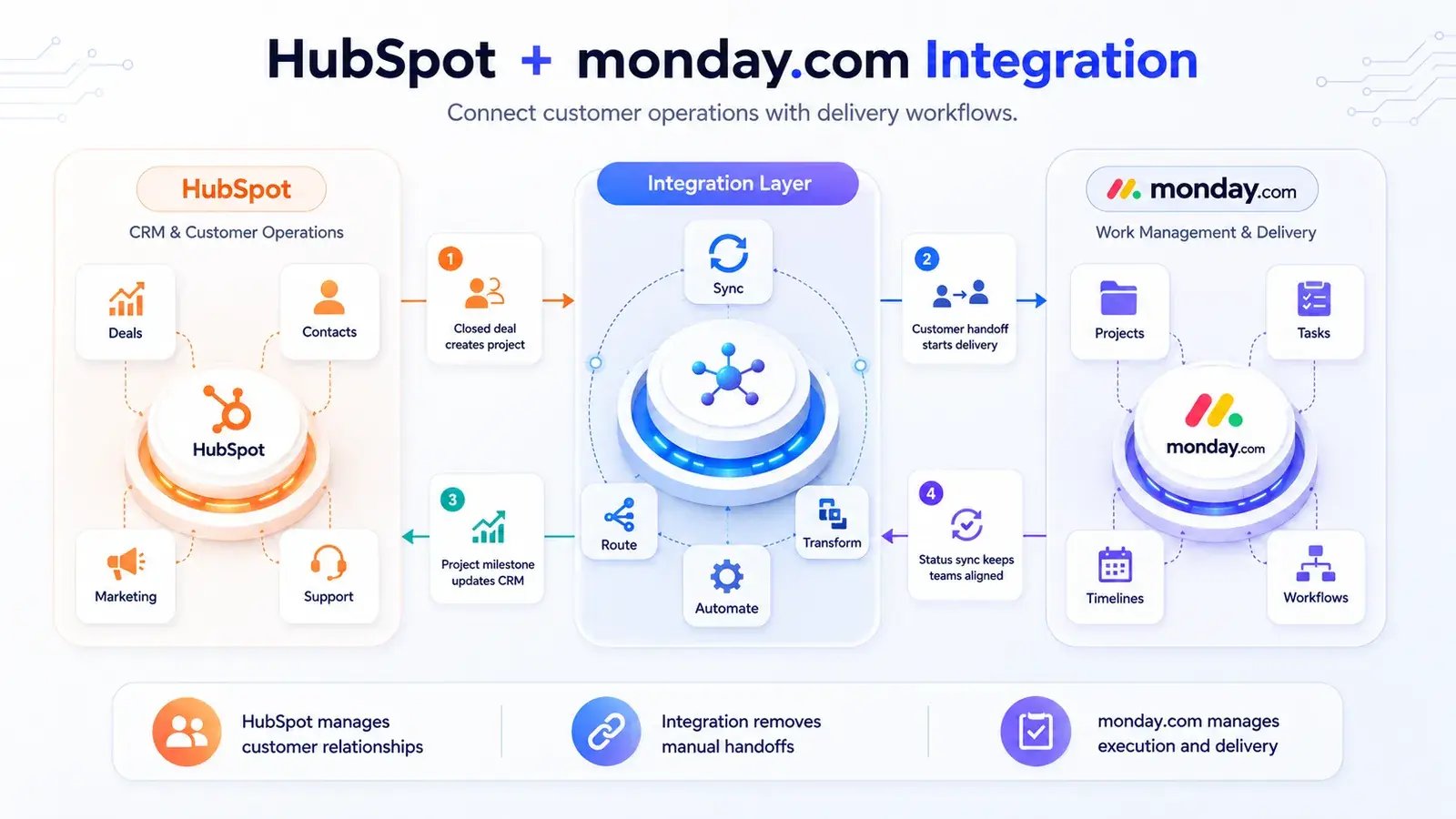
Using both tools together is common, and for many organizations it makes sense. The typical pattern is HubSpot for customer-facing operations and monday.com for internal project management and team workflows.
The challenge is keeping data consistent between them. A deal closed in HubSpot may need to trigger a project in monday.com. A delivery milestone in monday.com may need to update a customer record in HubSpot. Without a connection between the two systems, this coordination happens manually, which introduces delays and errors.
Teams that reach this point are usually looking for a way to connect HubSpot and monday.com so that relevant data flows between them automatically. This is a different problem from choosing between the tools: it is a question of integration architecture, not product selection.
The same pattern applies to organizations using Jira instead of monday.com: connecting Jira to HubSpot so that customer data is visible inside issues is a well-established approach, covered in detail in our guide to HubSpot Jira integration.
Choosing Between Them
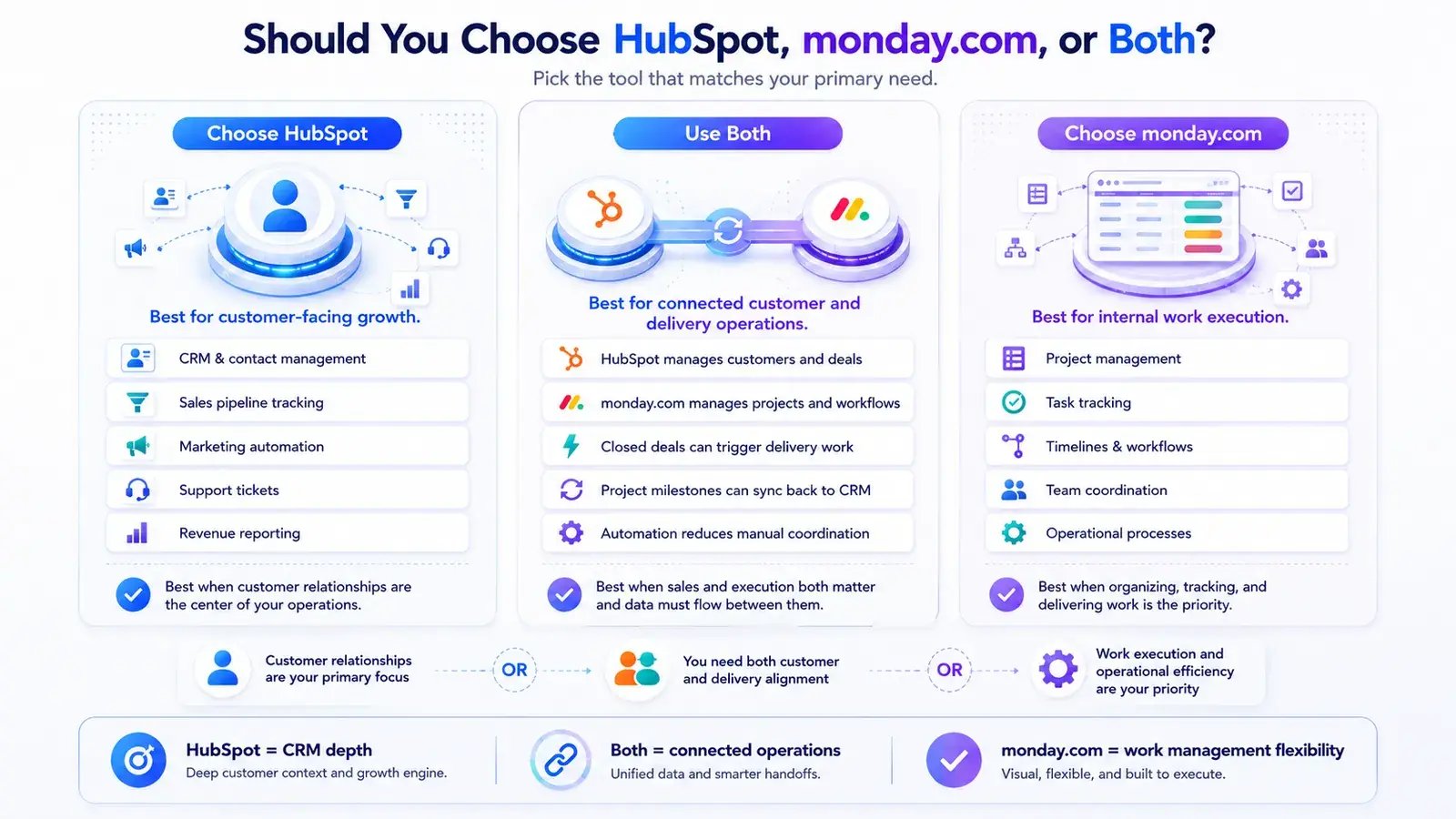
If your primary need is CRM, sales pipeline management, or marketing automation, HubSpot is the more appropriate tool. If your primary need is project management, workflow tracking, or team coordination, monday.com is the more appropriate tool.
If you need both, the question is not which one to choose but how to make them work together. The answer depends on what data needs to flow between them and how frequently it changes.
For teams evaluating their broader data management stack, our guide to data management tools covers how to think about tool selection and integration as part of a coherent architecture rather than a series of isolated decisions.
FAQ
Can monday.com replace HubSpot as a CRM?
For simple sales processes with a small team, monday.com's CRM template can be sufficient. For organizations with complex sales cycles, large contact databases, marketing automation needs, or detailed revenue reporting requirements, HubSpot provides capabilities that monday.com does not replicate. The right answer depends on the complexity of the sales operation.
Can HubSpot replace monday.com for project management?
HubSpot has task management features, but they are designed around customer-facing work rather than internal project management. Teams with significant project management needs typically find it insufficient as a monday.com replacement. HubSpot is optimized for managing customer relationships, not for planning and tracking work across teams.
Is monday.com a CRM?
monday.com can be configured to function as a lightweight CRM using its built-in templates. It handles basic pipeline tracking, contact management, and deal status. It does not have the depth of a dedicated CRM in areas like email integration, marketing automation, or revenue analytics. For teams that need those capabilities, a dedicated CRM like HubSpot is the more appropriate choice. Our article Is Jira a CRM? explores a related question for teams using Jira.
How do HubSpot and monday.com integrate with each other?
HubSpot and monday.com do not have a deep native integration. Most teams connect them through third-party automation tools or custom API work. The most common use case is triggering a monday.com item when a deal reaches a certain stage in HubSpot, or updating a HubSpot record when a project milestone is completed in monday.com.
Which tool is better for small teams?
For small teams, the choice depends on the primary use case. A small sales team benefits more from HubSpot's CRM structure. A small team managing projects and operations benefits more from monday.com's flexibility. Many small teams start with one and add the other as their needs grow.