
March 10, 2026
Most teams already use Google Sheets, Power BI, or HubSpot. The problem is not a lack of tools. The problem is that data stays fragmented across platforms, reports require manual updates, and no one agrees on which numbers are correct.
This guide helps you evaluate what you actually need, understand when to switch from spreadsheets to BI platforms, and build a stack that keeps data accessible where your team works.
What Data Management Tools Actually Do
Data management tools help you collect, organize, store, and distribute information across your organization. But "data management" means different things to different people.
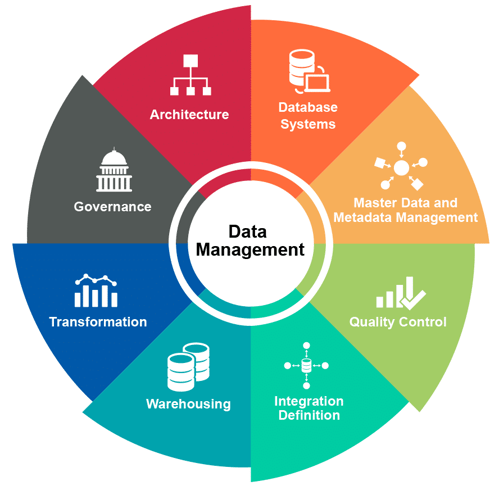
For some teams, it means a Google Sheet that tracks sales leads. For others, it means an enterprise data warehouse with governance policies and compliance controls. Both are valid, depending on what you need.
The distinction that matters is between tactical tools and strategic tools.
Tactical tools solve immediate problems. You need to track expenses, so you create a spreadsheet. You need to visualize sales trends, so you build a Power BI dashboard. These tools work well for specific tasks.
Strategic tools address how data flows across your organization. They answer questions like: Where does customer data live? Who can access financial reports? How do we ensure consistency between what sales sees and what operations sees?
The mistake most teams make is accumulating tactical tools without a strategic layer. You end up with data in HubSpot, Sheets, Power BI, Jira, and Confluence, but no clear picture of how it all connects. Reports conflict. Updates require manual effort. People spend more time finding information than using it.
Good data management is not about having the right tools. It is about knowing what each tool does well, where it falls short, and how to connect them into a system that works.
The Main Categories of Data Management Tools
Before choosing tools, you need to understand what each category does and where it fits in your workflow.
Spreadsheets: Google Sheets, Excel, Airtable
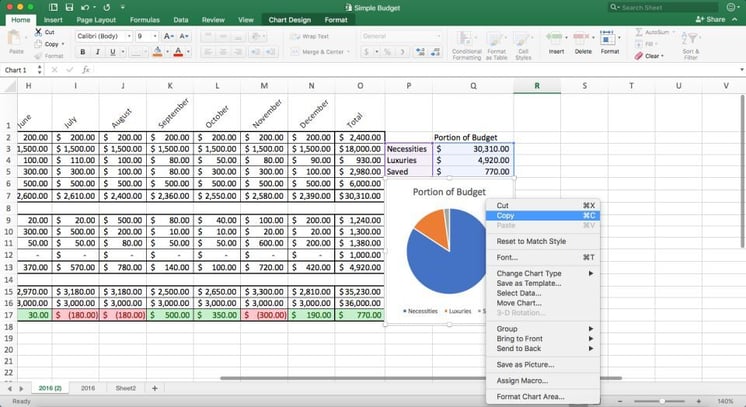
Spreadsheets remain the most widely used data tools in business. They are flexible, familiar, and fast to set up.
What they do well:
Spreadsheets excel at ad-hoc analysis, quick calculations, and small datasets. They require no setup, no training, and no IT involvement. Anyone can create a spreadsheet and start working immediately.
They also handle manual input well. Forecasts, targets, budgets, and other numbers that change frequently based on human judgment fit naturally into spreadsheets. You can adjust a cell, see the impact, and iterate quickly.
Where they fall short:
Spreadsheets struggle with scale. Performance degrades with large datasets, typically anything over 100,000 rows. Collaboration becomes difficult when multiple people edit the same file. Version control is manual, leading to the familiar "Budget_v6_FINAL_REAL.xlsx" problem.
They also lack governance. Anyone can change a formula, delete a column, or introduce errors. There is no audit trail, no access control beyond basic sharing settings, and no way to enforce data quality rules.
When to use them:
Use spreadsheets for small teams, ad-hoc analysis, manual input, and prototyping. If you need to track something quickly and the dataset is manageable, a spreadsheet is often the right choice.
For a deeper look at common pitfalls, see our guide on spreadsheet mistakes and how to fix them.
Business Intelligence Platforms: Power BI, Tableau, Looker
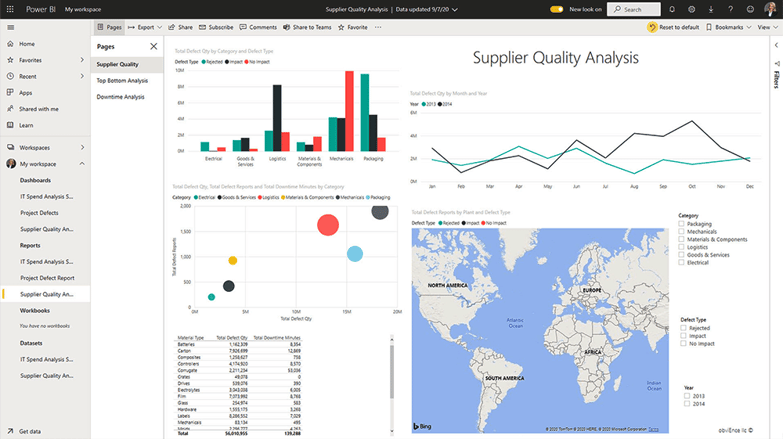
BI platforms turn raw data into visual insights. They connect to multiple data sources, create interactive dashboards, and distribute reports across teams.
What they do well:
BI tools handle large datasets efficiently. Power BI can process millions of rows without the performance issues that cripple spreadsheets. They also support automatic refresh, so dashboards stay current without manual intervention.
Visualization capabilities are far more advanced than spreadsheets. Interactive filtering, drill-down analysis, and complex chart types help teams explore data in ways that static spreadsheets cannot match.
Security and governance are built in. Row-level security restricts who sees what. Audit logs track access. Permissions can be managed centrally, which matters for sensitive financial or HR data.
Where they fall short:
BI tools do not fix bad data. If your source data is inconsistent, incomplete, or poorly structured, your dashboards will reflect that. BI platforms visualize data; they do not clean it.
They also require some learning curve. Building effective dashboards takes time and skill. Without proper training, teams often create visualizations that look impressive but do not answer the right questions.
When to use them:
Use BI platforms when you need reporting at scale, automatic refresh, centralized governance, or complex visualizations. If multiple teams need to see the same metrics with controlled access, a BI tool is the right choice.
To understand how Power BI fits into your workflow, read our complete guide to Power BI integrations.
CRM and Marketing Platforms: HubSpot, Salesforce
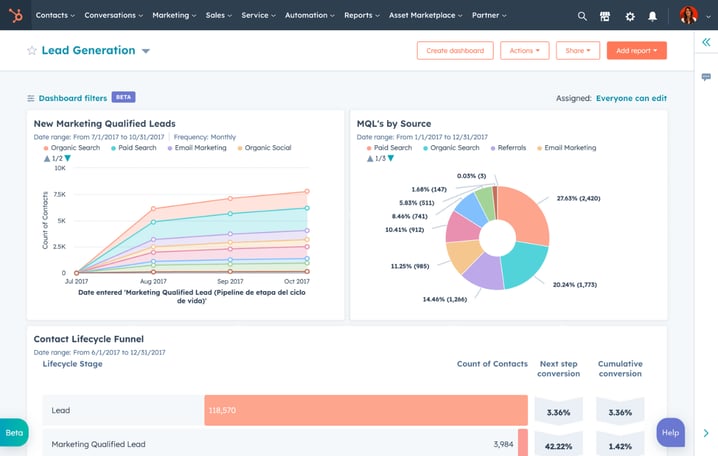
CRM platforms manage customer data, sales pipelines, and marketing interactions. They serve as the system of record for customer-facing teams.
What they do well:
CRMs provide a single view of customer relationships. Every interaction, from first website visit to closed deal to support ticket, lives in one place. This context helps sales and support teams respond effectively.
Automation capabilities reduce manual work. Lead scoring, email sequences, and workflow triggers operate without human intervention, scaling efforts that would otherwise require additional headcount.
Where they fall short:
CRM data often stays isolated from the rest of the organization. Sales knows everything about customers, but operations, product, and finance work with separate datasets. This creates friction when teams need to collaborate.
Data quality depends on user input. If sales reps do not update records consistently, the CRM becomes unreliable. Garbage in, garbage out applies especially to CRM systems.
When to use them:
Use CRM platforms when customer data drives your business. If your sales, marketing, or support teams need a shared view of customer interactions, a CRM is essential. The challenge is connecting that data to the rest of your stack.
Master Data Management and Data Quality Tools
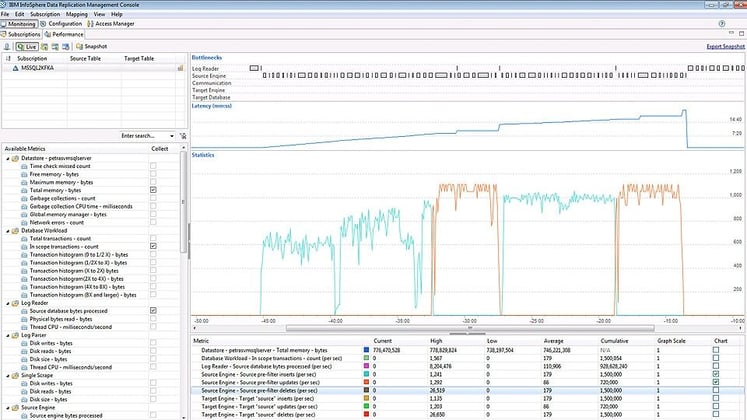
MDM tools ensure consistency across data sources. They handle deduplication, data lineage, compliance, and governance at an enterprise level.
What they do:
These tools create a single source of truth for critical business entities: customers, products, employees, locations. When the same customer appears in your CRM, ERP, and support system, MDM tools ensure the records match.
They also enforce data quality rules. Validation, standardization, and cleansing happen automatically, reducing errors that propagate through downstream systems.
When they matter:
MDM tools matter most for large organizations with multiple data sources, regulatory requirements, or complex integrations. If you are merging systems after an acquisition, or if compliance requires you to track data lineage, MDM tools become important.
For most small and mid-sized teams, data quality is better addressed through process and discipline than through dedicated tooling. Clear ownership, regular audits, and consistent input practices solve many problems that MDM tools address at scale.
Spreadsheets vs BI Tools: When to Make the Switch
The question is not which tool is better. Both serve different purposes. The question is when your needs have outgrown what spreadsheets can handle.
Signs you need a BI tool
Your datasets exceed ∼100,000 rows. Spreadsheets slow down significantly with large data volumes. If you find yourself waiting for calculations to complete or experience crashes when opening files, a BI tool will perform better.
Multiple people need the same report. When the same metrics matter to sales, operations, and leadership, maintaining separate spreadsheets leads to inconsistency. A centralized dashboard ensures everyone sees the same numbers.
Reports require frequent refresh. If you spend hours each week updating spreadsheets with new data, automatic refresh in BI tools saves that time. Connect to your data source once, and dashboards stay current.
You need access control. Spreadsheets offer limited permission management. If different teams should see different data, row-level security in BI platforms provides that control without maintaining separate files.
Manual processes introduce errors. Copy-paste mistakes, formula errors, and version confusion are symptoms that your data workflow needs more structure than spreadsheets provide.
Signs a spreadsheet still works
You are doing one-off analysis. For quick investigations or ad-hoc questions, setting up a BI dashboard is overkill. Open a spreadsheet, explore the data, and move on.
Your team is small. With fewer than five people working on the same data, collaboration overhead is low. A shared Google Sheet can handle the coordination.
You need manual input. Forecasts, targets, and assumptions that change based on human judgment fit better in spreadsheets. BI tools display data; they do not replace the need for manual planning.
The data does not require audit trail. If you do not need to track who changed what and when, spreadsheets offer sufficient functionality without the complexity of governance features.
Five Questions to Evaluate Any Data Management Tool
Before adopting a new tool, answer these questions honestly. The best tool is the one that fits your actual workflow, not the one with the most features.
1. Does it connect to your existing systems?
Integration matters more than features. A tool that does not connect to your data sources creates another silo. Check for native connectors to your databases, CRM, ERP, and project management platforms. API access matters if native connectors are unavailable.
The fewer manual steps between data source and tool, the fewer opportunities for errors.
2. Who owns the data, and who can access it?
Every dataset needs an owner responsible for its accuracy. Every tool needs clear access policies. Ask: Can you restrict access by role? Is there an audit trail? Can you revoke access when someone leaves the team?
These questions matter even for small teams. Access control prevents mistakes and builds trust in the data.
3. How does it handle data quality?
Bad data leads to bad decisions. Check whether the tool offers validation rules, alerts for anomalies, or deduplication features. If not, you need a separate process to ensure quality before data enters the system.
The earlier you catch errors, the less damage they cause downstream.
4. What is the real cost?
License fees are only part of the equation. Add training time, implementation effort, ongoing maintenance, and the hours your team spends working around limitations.
A free tool that requires ten hours a week of manual work is not free. A paid tool that eliminates that work may cost less in total.
5. Can it scale with your team?
What works for five users may not work for fifty. What handles 10,000 rows may not handle 10 million. Ask how pricing changes as you grow. Ask how performance changes with volume. Plan for where you will be in two years, not just where you are today.
The Missing Piece: Making Data Accessible Where Work Happens
Even with the right tools, data often stays disconnected from the context where decisions happen. A project manager checks Power BI for metrics, then switches to Jira to update a ticket, then opens Confluence to write a summary. Each switch takes time and breaks focus.
The solution is bringing data into the workflow.
Consider a sprint retrospective. The team reviews what worked and what did not. If velocity data lives in Power BI and the discussion happens in Confluence, someone needs to export a screenshot, paste it into a document, and hope it does not become outdated before the meeting.
With embedded dashboards, the Confluence page shows live velocity data. The team discusses numbers that update in real time, without needing to export anything or worry about outdated screenshots.
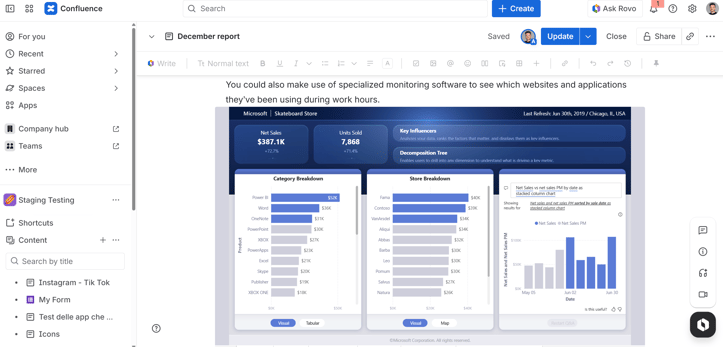
The same principle applies across scenarios. Budget reviews in Confluence can display live Google Sheets data. Project boards in monday.com can show Power BI metrics. Jira dashboards can include performance KPIs alongside tickets.
This is not about having more tools. It is about connecting the tools you already use so data flows naturally into the places where people work.
For practical guidance on embedding data into your workflow, see our guides on Google Sheets integration with Confluence and monday.com and Power BI integration for Confluence.
How to Build a Data Management Stack That Works
Building an effective data stack is not necessarily about buying the best tools. It is about understanding your needs, choosing tools that fit, and connecting them into a coherent system.
Step 1: Map your data sources and flows
Start by documenting where data originates, where it needs to go, and who uses it along the way. Draw a simple diagram showing systems, data flows, and people.
This exercise often reveals redundancies and gaps. You may find three teams maintaining separate customer lists, or discover that critical metrics have no clear owner.
Step 2: Define ownership and access policies
Every dataset needs someone responsible for its accuracy. Every tool needs clear rules about who can view, edit, and share data.
Write these policies down. "The finance team owns the revenue dataset and updates it weekly. Sales and marketing have view access. Changes require finance approval."
Clear ownership prevents conflicts and ensures someone is accountable when data quality slips.
Step 3: Choose tools by function, not by trend
Match tools to specific jobs. Spreadsheets for ad-hoc analysis and manual input. BI platforms for reporting and dashboards. CRMs for customer data.
What matters is keeping data connected and accessible, so there is less friction between where it lives and where decisions happen.
Step 4: Connect tools to where work happens
Data that stays locked in a tool has limited value. Look for integration points that bring data into daily workflows.
Can Power BI dashboards embed in Confluence pages? Can Google Sheets data appear in monday.com boards? Can HubSpot metrics show up in Jira? These integrations are already possible with the right tools. See what is available for Atlassian and monday.com.
Each integration reduces context switching and makes data more accessible to the people who need it.
Step 5: Review and iterate quarterly
Your data needs will change. New projects, new teams, new systems all affect how data flows through your organization.
Schedule quarterly reviews to assess what is working and what is not. Remove tools that no one uses. Add integrations where friction exists. Update access policies as roles change.
Data management is not a one-time project. It is an ongoing practice.
Common Mistakes and How to Avoid Them
Buying tools before defining the problem
It is tempting to solve data problems by purchasing new software. But tools do not fix unclear requirements or missing processes.
Before evaluating tools, clarify what problem you are solving. What decisions need better data? What reports take too long to produce? What errors keep recurring?
Start with the problem, then find the tool that addresses it.
Ignoring data quality until something breaks
Bad data accumulates quietly until it causes a visible problem: a wrong report to leadership, a compliance issue, a customer complaint.
Build quality checks into your process from the start. Validate inputs. Flag anomalies. Review datasets regularly. The cost of prevention is far lower than the cost of cleanup.
Creating data silos between departments
Sales uses HubSpot. Operations uses Sheets. Finance uses Power BI. Each team has data, but no one has the complete picture.
Silos form naturally as teams adopt tools that fit their workflow. Breaking them requires deliberate effort: shared definitions, connected systems, and regular cross-functional reviews.
The result is better collaboration and fewer conflicts over which numbers are correct.
Overcomplicating the stack
More tools do not mean better data management. Each additional tool adds maintenance overhead, integration complexity, and potential failure points.
Before adding a new tool, ask whether an existing tool can do the job. Often, the answer is yes with some configuration or process adjustment.
Simplicity often scales better than complexity.
Building a System That Works
Data management is about building a system where data flows reliably from source to decision.
That system includes tools, but also processes, ownership, and connections. Spreadsheets have a place. BI platforms have a place. CRMs have a place. The challenge is making them work together.
Start with your most pressing problem. Map the data flow. Choose a tool that fits. Connect it to where people work. Then iterate.
The goal is not perfection. The goal is a system that helps your team make better decisions faster, with less time spent searching for information and more time spent using it.
FAQ
What are data management tools?
Data management tools are software applications that help organizations collect, store, organize, and distribute data. They range from simple spreadsheets to enterprise platforms that handle governance, quality, and compliance. The category includes BI tools like Power BI, CRMs like HubSpot, spreadsheets like Google Sheets, and specialized platforms for master data management.
Is Excel a data management tool?
Yes, Excel is a data management tool, but with limitations. It works well for small datasets, ad-hoc analysis, and manual input. It struggles with large data volumes, collaboration at scale, and governance. Many teams start with Excel and move to BI platforms or databases as their needs grow.
What are master data management tools?
Master data management (MDM) tools ensure consistency across data sources. They handle deduplication, data lineage, and governance for critical business entities like customers, products, and employees. Examples include Informatica MDM, SAP Master Data Governance, and IBM InfoSphere. Most small and mid-sized teams address these needs through process and discipline before investing in dedicated MDM software.
How do I integrate BI tools with work management data?
BI tools like Power BI can connect to work management platforms through native connectors, APIs, or embedding. For example, you can embed Power BI dashboards directly into Confluence pages or monday.com boards, so teams see metrics without leaving their workflow. This keeps data accessible where decisions happen. See what integrations are available for Atlassian and monday.com.
What is the difference between a data management tool and a BI tool?
Data management is a broad category that includes collection, storage, governance, and distribution. BI tools are a subset focused specifically on visualization and analysis. A BI platform like Power BI helps you see and explore data; a data management strategy addresses where that data comes from, who maintains it, and how it flows across your organization.
Do I need a dedicated data management platform, or can I use spreadsheets?
It depends on scale and complexity. For small teams with simple needs, well-organized spreadsheets can handle data management effectively. As data volume grows, as more people need access, or as compliance requirements increase, dedicated tools become necessary. The tipping point is usually when manual processes consume significant time or when errors become frequent.
How do I ensure data quality across multiple tools?
Data quality requires both tools and process. On the tool side, use validation rules, alerts for anomalies, and access controls to prevent unauthorized changes. On the process side, define clear ownership, establish regular review cycles, and document standards for data entry. Quality is not a feature you enable; it is a practice you maintain.
What is the best data management approach for small teams?
Start simple. Use spreadsheets for data that changes frequently or requires manual input. Use a BI tool for dashboards that multiple people need to see. Connect your tools to your workflow so data appears where people work. Focus on clear ownership and consistent practices rather than advanced tooling. You can add complexity later as needs grow.
How do data management tools support compliance (GDPR, SOC 2)?
Compliance requires knowing what data you have, where it lives, who can access it, and how long you keep it. Data management tools support this through access controls, audit logs, data lineage tracking, and retention policies. BI platforms add row-level security so different users see only what they are authorized to view. The tools provide the mechanisms; your policies determine how to use them.
Looking for ways to bring your Power BI reports, Google Sheets, or HubSpot data into Jira, Confluence, or monday.com? Explore integrations for Atlassian and monday.com