
April 22, 2026
According to an IDC study of 1,500 enterprise leaders, 68% of data available to businesses goes unused. Not because it lacks value, but because it sits in the wrong place at the wrong time. The problem is not so much about collection as it is about fragmentation: data spread across tools that do not communicate with each other.
Data warehouses and data hubs are two ways to build that bridge. They share the goal of centralizing data, but they approach it differently: one prioritizes historical depth, the other prioritizes real-time distribution.
This guide covers how each architecture works, when to choose one over the other, and what matters most for teams that rely on work management platforms for daily operations.
What Is a Data Warehouse?
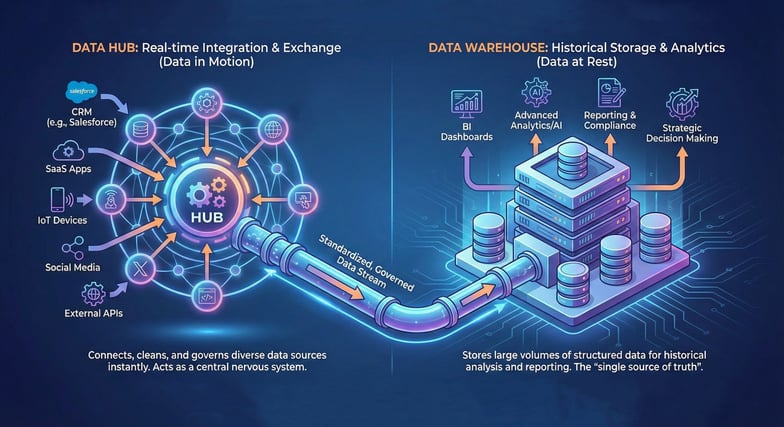
A data warehouse is a centralized repository designed to store large volumes of structured, historical data. It collects information from multiple source systems, transforms it into a consistent format (a process known as ETL: Extract, Transform, Load), and makes it available for querying and reporting.
Data warehouses have been a standard part of enterprise architecture for over 30 years. Products like Snowflake, Google BigQuery, Amazon Redshift, and Microsoft Azure Synapse are modern examples of this model. They all share the same core principle: bring data together, clean it up, and store it in a structured schema optimized for analytical queries.
Strengths
Data warehouses excel at answering historical questions. If you need to compare this quarter's performance against the same period last year, track long-term trends, or run complex SQL queries across large datasets, a warehouse is built for that. The structured schema ensures data consistency, and the optimized query engines handle billions of rows efficiently.
Limitations
The ETL process introduces latency. Data typically arrives in batches (hourly, daily, or even weekly), which means the warehouse rarely reflects real-time conditions. Adding new data sources or changing the schema can be slow, because the rigid structure that makes warehouses reliable also makes them less flexible. For teams that need up-to-the-minute data inside their daily tools, this delay creates blind spots.
What Is a Data Hub?
A data hub is a centralized integration layer that connects multiple systems and allows data to flow between them in near-real time. Unlike a warehouse, which stores historical snapshots, a data hub focuses on standardizing, enriching, and distributing data across the organization as it changes.
Think of a data hub as a traffic controller for your data. It sits between your source systems (CRM, project management, BI tools, spreadsheets) and ensures that every system has access to consistent, up-to-date information. Data hubs use a hub-and-spoke model: data flows into the hub from various sources, gets harmonized, and flows back out to wherever it is needed.
Strengths
Data hubs are built for operational agility. They handle multiple data formats (structured, semi-structured, and sometimes unstructured), support real-time or near-real-time data flows, and adapt quickly when new sources are added. They also enforce governance rules at the point of integration, which means data quality issues are caught early rather than discovered later during analysis.
Limitations
Data hubs are not designed for heavy analytical workloads. Running complex aggregation queries across years of data is better suited to a warehouse. Hubs focus on making current data available and consistent across systems, not on long-term storage or deep historical analysis.
Data Hub vs. Data Warehouse: Key Differences
The table below summarizes the core differences when comparing a data warehouse vs a data hub. Use it as a quick reference when evaluating which model fits your needs.
| Dimension | Data Warehouse | Data Hub |
|---|---|---|
| Primary purpose | Historical analysis and reporting | Real-time integration and data sharing |
| Data freshness | Batch updates (hourly, daily, weekly) | Near-real-time or event-driven |
| Schema model | Schema-on-write (rigid, predefined) | Flexible, often schema-on-read |
| Data types | Structured only (rows and columns) | Structured, semi-structured, multi-format |
| Best for | Trend analysis, compliance, BI dashboards | Cross-tool sync, operational decisions, governance |
| Flexibility | Low (schema changes require planning) | High (new sources added quickly) |
Why This Matters for Work Management Teams
Work management platforms like Jira, Confluence, and monday.com are where teams plan, execute, and track their work. However, these platforms are designed to manage tasks, pages, and boards, not to serve as centralized repositories for the business context those items relate to.
Consider a product team running sprints in Jira. Velocity data is in Jira, revenue impact is in the CRM, resource costs are tracked in an HR system, and customer feedback comes from a support tool. To make informed decisions about what to build next, a product lead needs data from all four systems, ideally without leaving their primary workspace.
This is exactly the kind of problem that data architecture is meant to solve, and the choice between a warehouse and a hub depends on how your teams need to access that data.
When a Data Warehouse Makes Sense
If your team needs quarterly business reviews, year-over-year comparisons, or regulatory reports that pull from multiple sources, a data warehouse is the right foundation. It stores clean, historical data and makes it available for BI tools like Power BI or Tableau. The trade-off is latency: data in the warehouse may be hours or days old.
When a Data Hub Makes Sense
If your team needs consistent, current data across multiple tools (for example, making sure that a customer record in HubSpot, a related Jira issue, and a Google Sheets forecast all reflect the same information), a data hub is built for that purpose. It keeps systems aligned without requiring manual exports or batch jobs.
When You Need Both
Many organizations benefit from running both architectures together. The data hub handles real-time integration and cross-tool consistency, while the warehouse stores curated historical data for deep analysis. In this model, the hub often feeds the warehouse, reducing transformation overhead and improving data quality upstream.
How a Data Hub Architecture Works in Practice
A data hub connects to your existing tools through ingestion connectors. These connectors pull data from source systems (Jira, HubSpot, Google Sheets, Power BI) and push it into a centralized layer where it gets standardized and enriched.
Here is a simplified view of the flow:
1. Ingestion. Connectors pull data from multiple sources. When a Jira issue is updated, a HubSpot deal closes, or a Google Sheet is modified, the hub captures those changes.
2. Harmonization. The hub reconciles differences in data formats and definitions. "Customer" in the CRM and "Account" in the project tracker become the same entity.
3. Distribution. Clean, standardized data flows back to the systems that need it. Any tool connected to the hub, whether it is a BI platform, a project tracker, or a documentation system, receives the same consistent data set.
4. Governance. Rules about data access, quality, and lineage are enforced at the hub level. This means every downstream consumer gets data that meets the same standards.
Practical Scenarios: Choosing the Right Architecture
Scenario 1: Quarterly Board Reporting
A Head of Operations needs to present a quarterly review combining financial data, project delivery metrics, and customer satisfaction scores. The data comes from multiple tools, but accuracy and consistency matter more than speed.
Best fit: Data warehouse. The batch processing model works here because the reporting cycle is predictable and historical accuracy is the priority.
Scenario 2: Cross-Team Sprint Planning
A product manager wants to see live CRM data alongside sprint backlogs during planning sessions. Embedding Power BI reports in Jira dashboards is one way to achieve this, but a data hub goes further by keeping the underlying data consistent across all connected systems.
Best fit: Data hub. Real-time data flow keeps all systems aligned. The product manager sees current information without switching tools or waiting for nightly syncs.
Scenario 3: Enterprise Data Strategy
A CTO is building a data strategy roadmap for an organization that uses Atlassian tools, Power BI, HubSpot, and Google Sheets. Some teams need live dashboards in their daily workflow. Others need historical trend analysis for strategic planning.
Best fit: Both. A data hub feeds current data into work management tools and simultaneously populates a data warehouse for long-term analysis. Each system does what it does best.
How to Evaluate Your Needs: A Decision Checklist
Before choosing an architecture, work through these questions with your team:
| Question | Points Toward |
|---|---|
| Do you need data in real time inside your daily tools? | Data Hub |
| Do you run complex SQL queries across years of data? | Data Warehouse |
| Do your teams frequently switch between 3+ tools for context? | Data Hub |
| Is regulatory compliance and audit trail a top priority? | Data Warehouse (or both) |
| Do you need to add new data sources quickly? | Data Hub |
| Are you building BI dashboards for strategic planning? | Data Warehouse |
If most of your answers point toward a data hub, you are likely dealing with an operational data challenge. If they point toward a warehouse, your priority is analytical depth. If the answers split evenly, consider a combined architecture.
What to Look for in a Data Hub for Work Management
Not every enterprise data hub is built for teams that run on Atlassian or monday.com. When evaluating options, focus on these criteria:
Native connectors for your stack. The hub should integrate directly with Jira, Confluence, monday.com, Power BI, Google Sheets, and HubSpot without requiring custom development.
Flexible data modeling. Every organization defines its data differently. The hub should let you define your own entities, relationships, and structures rather than forcing a rigid schema.
Graph-based data organization. A knowledge-graph structure makes it easier to navigate relationships between entities (projects, customers, teams, metrics) and supports AI-driven analytics.
Governance and security. Role-based access, data lineage tracking, and compliance controls are not optional for enterprise adoption.
Scalability. The hub should grow with your organization. Adding new teams, tools, or data sources should not require a re-architecture.
Choosing the Right Path Forward
Choosing between a data hub and a data warehouse is not about which technology is objectively better. It is about understanding how your teams work and what kind of data access they need to be effective.
If your organization relies on Atlassian tools, monday.com, Power BI, or Google Sheets for daily operations, the way data flows between those systems has a direct impact on decision speed, accuracy, and team productivity. A data warehouse provides the analytical depth for long-term reporting, while a data hub keeps operational data consistent and current across tools. In many cases, the best results come from combining both.
A good starting point is to map your current data flows: understand where information originates, where it needs to go, and how quickly it needs to get there. That exercise will make the architectural choice much clearer.
FAQ
What is the main difference between a data hub and a data warehouse?
A data warehouse stores structured historical data for analysis and reporting. A data hub integrates and distributes current data across multiple systems in near-real time. In simple terms, a warehouse is optimized for understanding what happened over time, while a hub is optimized for keeping systems aligned with what is happening now.
Can a data hub replace a data warehouse?
Not entirely. They serve different purposes. A data hub excels at real-time data integration and cross-tool consistency, but it is not optimized for storing and querying large volumes of historical data. Many organizations use both together.
How does a data hub work with tools like Jira or monday.com?
A data hub connects to these platforms through ingestion connectors. It pulls data from Jira issues, monday.com boards, and other sources, harmonizes it, and makes it available as a unified data set across your entire tool stack. This means that every connected system works with the same consistent information, without manual exports or reconciliation.
What is a data hub architecture?
Data hub architecture follows a hub-and-spoke model. The hub sits at the center, connecting to multiple data sources and consumers. Data flows into the hub, gets standardized and enriched, and flows back out to the tools that need it. This is different from a data warehouse, which follows an ETL pipeline model where data moves in one direction.
Is a data hub the same as a data lake?
No. A data lake is a storage system for large volumes of raw, unstructured data. A data hub is an integration and distribution layer that standardizes data and shares it across systems. While a data lake stores data for later analysis, a data hub actively manages and routes data between applications.
Looking for a first step toward better data visibility? Presago apps let you embed live Power BI, Google Sheets, and HubSpot data directly into Jira, Confluence, and monday.com. Explore Presago apps